.svg)
We guarantee it.
Synced spreadsheets, drive folders, and map features between Mobile and Web.
%20(2).png)
Managing multiple telecom projects?
Crews unsure whats assigned or completed?
Office chasing updates all day?
Photos and documentation scattered?
Staff feeling overwhelmed during peak construction season?
Whether your paid per service drop, drilled meter, splice, or connection, speed and clarity matter. Every stage of the project has a cost - our goal is to help your team save time and money.
Photo and file attachments linked directly to your projects.
%20(3).png)
.png)
Live Project Visibility
See open, in-progress, and completed project stages in real time.
Field-to-Office Sync
Crews update status from mobile. Office sees it instantly.
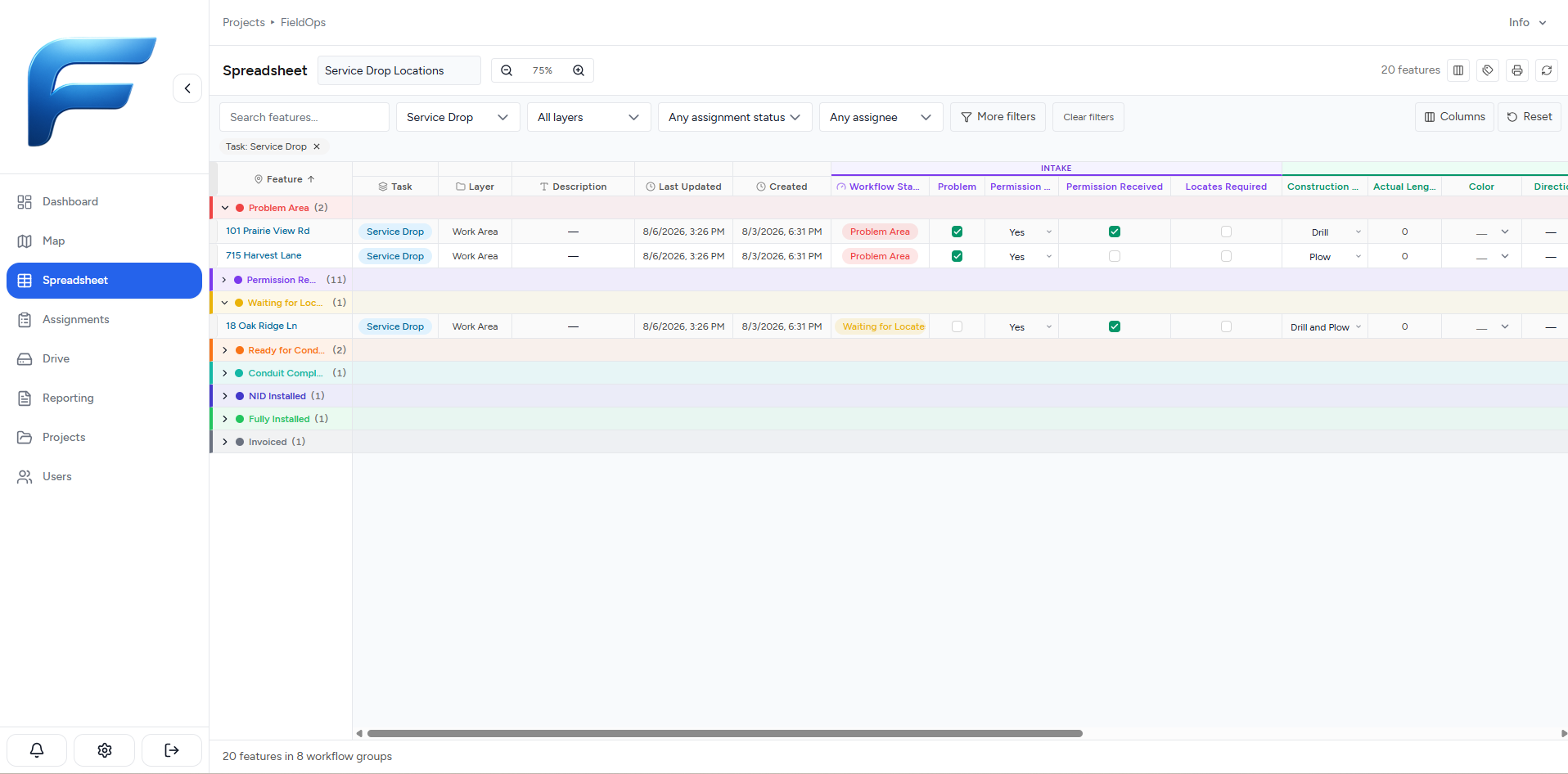
Spreadsheets
Use FieldOps' spreadsheets to easily view project details.
Photo & Evidence Capture
Attach proof directly to the exact location, rather than just inside a folder.
Accountability
Assign telecom tasks to crew members, they handle the rest.
Audit-Ready Records
All actions inside the app are synced to map locations, spreadsheets, and drive folders.
FieldOps aims to help your telecom crew members have a better understanding of projects. and gives every person using it the ability to contribute to projects in an easy way. We also strive to make this software affordable for smaller teams. We also offer a 7-Day trail at no cost.
Our Starter plan = $99/month for 5 users
If our software doesn't bring $20 of value per team member, then let us know how it can and we'll do our best to accomodate your needs.
.png)
.png)
.png)
Need more information? Reach out to us at: info@pocketrobot.ca
Monthly Clients can cancel at anytime if you're not satisfied. All we ask for is your feedback.
FieldOps is designed for teams managing telecom projects. Whether you’re coordinating a few house service installs, or thousands of mainline meters, FieldOps brings structure, visibility, and accountability to your operations.
Small to Mid-Sized Directional Drilling Contractors
Coordinate drillshots, track install status, and keep crews aligned with real-time updates tied directly to location.
Teams Handling High Project Volumes
Manage hundreds of locations per day with operational clarity.
Saving Your Team's Time
Better project tracking means more money made and less time wasted.
Operations That Need Speed and Documentation Clarity
Allow your crews to focus on the drilling, plowing, and vault installations, while making the admin work easier.
Up and running in minutes — no IT setup, no training required.
Step 1: 7-Day Free Trial
Use the form to sign up for the app for free. You'll be sent a link to your email to setup your FieldOps account.
Step 2: Choose your Tier
At anytime during or after the free trial, use the Upgrade Plan button inside the app, choose the tier you would like to purchase to continue using the app. If you're interested in the Enterprise tier, or to have additional customizations applied, reach out to our team here.
Step 3: Go Live
Start inviting the rest of your team, and you’re ready to start managing work inside FieldOps
.png)
Q: Do you offer a demo or trial?
Yes, we offer a 7-day free trial. Plans can be upgraded at any time during or after the trial.
Q: How long does setup take?
Setup time is as simple a filling out the form. After the form is filled out, you will be sent an email to set up your account.
Q: How is my company's data stored?
FieldOps data is stored inside Microsoft Cloud infrastructure. All data is encrypted while in transport and at rest using industry standard methods such as TLS 1.2. For more information, please read our Terms of Service and Privacy Policy.
Q: How are payments handled?
Payments are handled through Stripe. Pocket Robot does not handle or store credit card information.
Q: Can I upgrade or change plans later?
Absolutely. Plans can be upgraded as your team or project needs grow.
Q: Can I cancel at anytime?
Yes, you can cancel your free trial at anytime.
If you're on a paid plan, cancellations can be done inside your Customer portal, or by contacting us here: info@pocketrobot.ca
Q: Is there a mobile app?
Yes, both the mobile app and web app is included in all tiers.
FieldOps is designed to work seamlessly on mobile devices for field crews. Currently only available on iOS. Android will be available by November 2026. If you'd like early access email: info@pocketrobot.ca
Q: What kind of support is included?
All plans include support via email.
Professional and Enterprise plans include priority response and onboarding assistance.
Q: Can this replace our spreadsheets?
Not entirely. Spreadsheets within FieldOps are simplified and best used for in-app processes.
Contact us with any questions or concerns:
Built in Canada for Canadian Utility Operations